QuoteWerks F2 lookup and double click does not work

This is another reasonable common query that our clients have which is usually due to the particular User’s Preference settings that is logged in on a particular workstation. Furthermore it will usually affect the User on any workstation that they try and if they log in as a.n.other User then QuoteWerks will probably behave as expected.

Ref. screenshots below – we have found that is usually due to one of two reasons:

  1. Please make sure that the Tools menu | My Preferences | Misc tab | ‘Enable double-click…” option is ticked
  2. If that does not resolve it, then set the Tools menu | My Preferences | Appearance tab | Color Scheme tab option to “(System)”
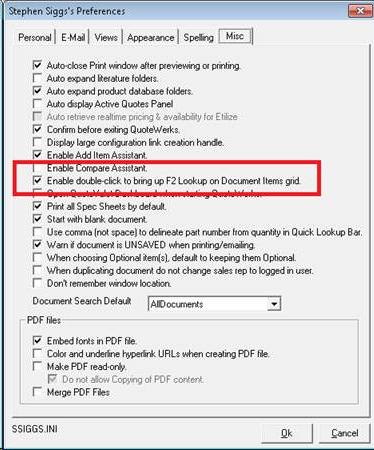
QuoteWerks Preferences, Enable double-click

Related Stories

See all

Introducing the ConnectIt QuoteWerks Reporting Portal: Enterprise Insights, Turn‑Key Setup

May 11, 2026

A new way for QuoteWerks users to unlock live and historical reporting with a free 30‑day Enterprise trial. If you rely on QuoteWerks data to run your business, reporting shouldn’t be hard. Yet for many QuoteWerks users, meaningful reporting still means: At Hilltops IT, we work with QuoteWerks every day and one thing is consistent: […]

READ MORE

Announcing the BETA Launch of the ConnectIt Software Web Portal for QuoteWerks Reporting

Apr 26, 2026

We’re excited to announce the BETA release of the ConnectIt Software Web Portal for QuoteWerks Reporting – a new, web‑based reporting solution designed to give QuoteWerks users secure, flexible access to their reporting data from anywhere. This BETA release marks a major step in our ongoing effort to extend and modernise QuoteWerks reporting, while respecting […]

READ MORE

How Smart Software is Powering Small Manufacturers: Trends and Tools for 2025

Oct 10, 2025

In today’s fast-moving manufacturing world, it’s not just the machines on the shop floor that are getting smarter – it’s the software behind the scenes too. For managers in micro, small, and medium-sized manufacturing businesses, staying competitive means more than just making great products. It means running a tight ship behind the scenes: quoting quickly, […]

READ MORE